Now on iPhone and Android

Know what's on every shelf,
in every branch.

Ventra pairs a barcode-first mobile app for your floor team with a live web dashboard for managers. Same stock, same locations, same history, in your own brand.

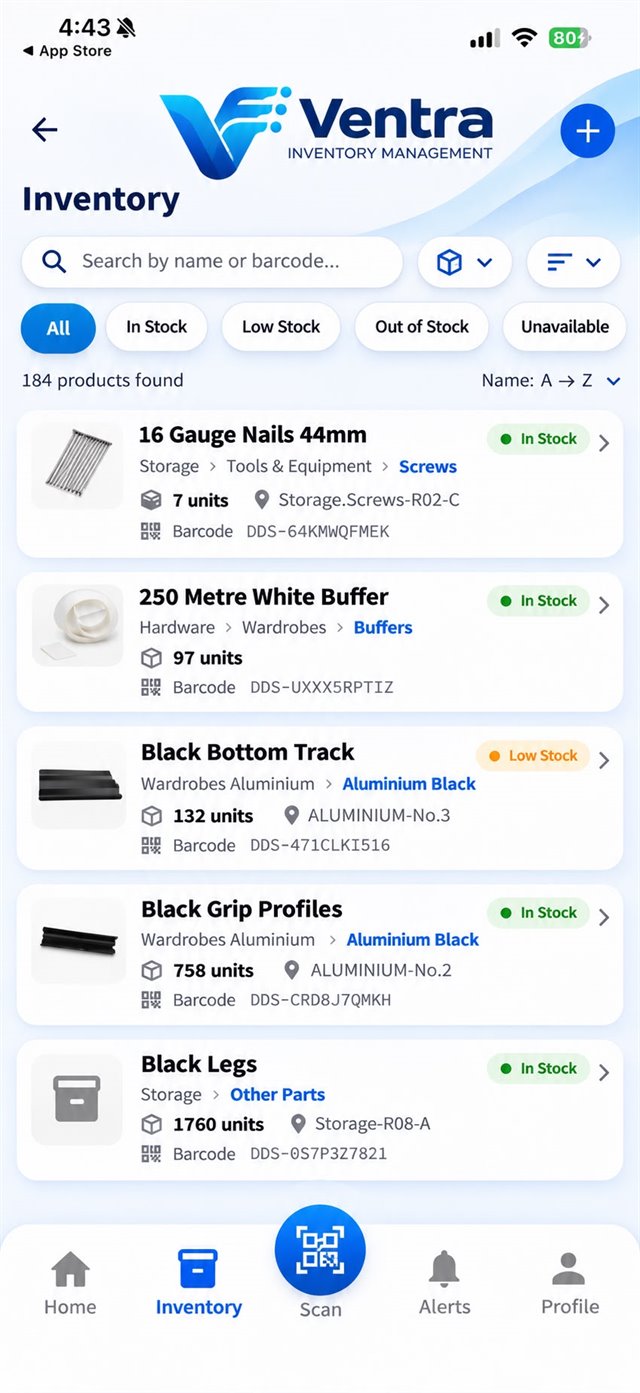
Ventra inventory list with search and stock filters
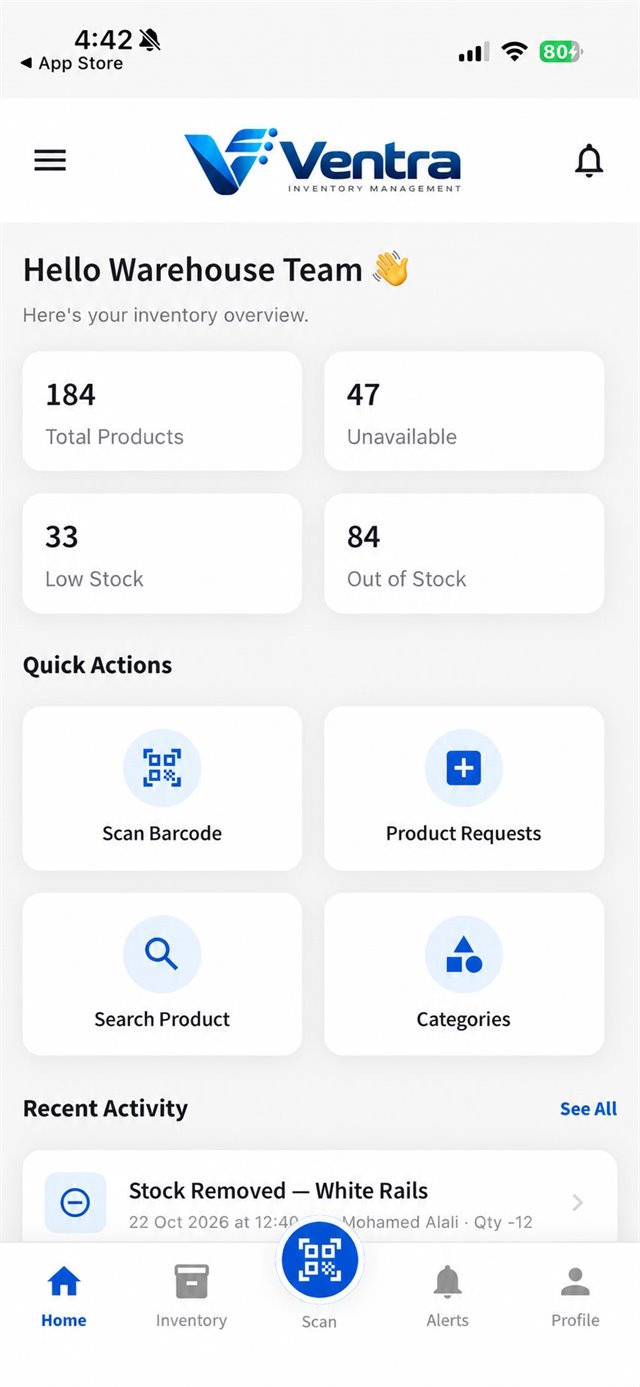
Ventra app home screen with total products, low stock and out-of-stock counts
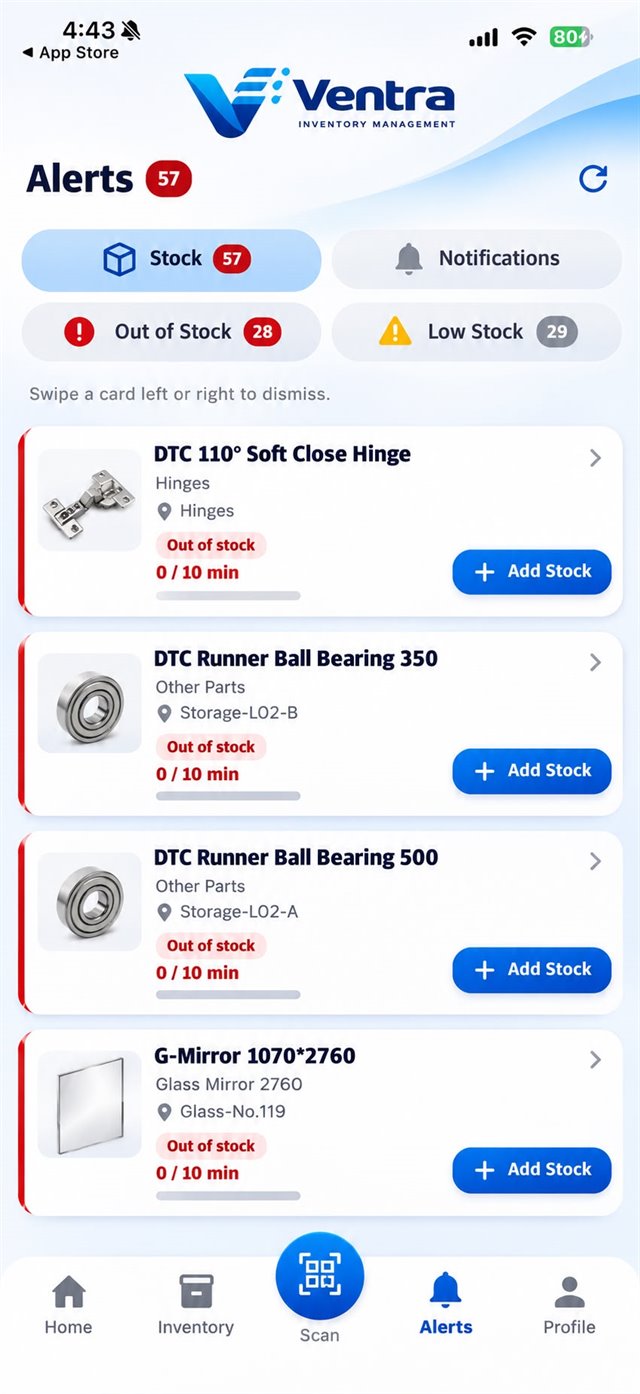
Ventra alerts screen listing low and out-of-stock products

Know who moved what, and when

When someone on the floor adds, removes or marks stock as damaged, Ventra records their name, the product, the quantity, the branch and the time. Managers see it on the dashboard straight away.

1 On the floor
2 On the dashboard
Stock activityAll branches
Live

    Example data

    Spreadsheets don't scan barcodes. Whiteboards don't send low-stock alerts. And nobody remembers who took the last box.

    Ventra handles all three.

    The whole stockroom in your team's pocket

    Staff sign in with a 4-digit code and get straight to work.

    1. Totals, low stock, out of stock and the latest activity the moment you open the app.

      • Total products
      • Low stock
      • Recent activity
    2. Search by name or barcode, and filter by in stock, low, out of stock or unavailable.

      • Search
      • Barcode lookup
      • Stock filters
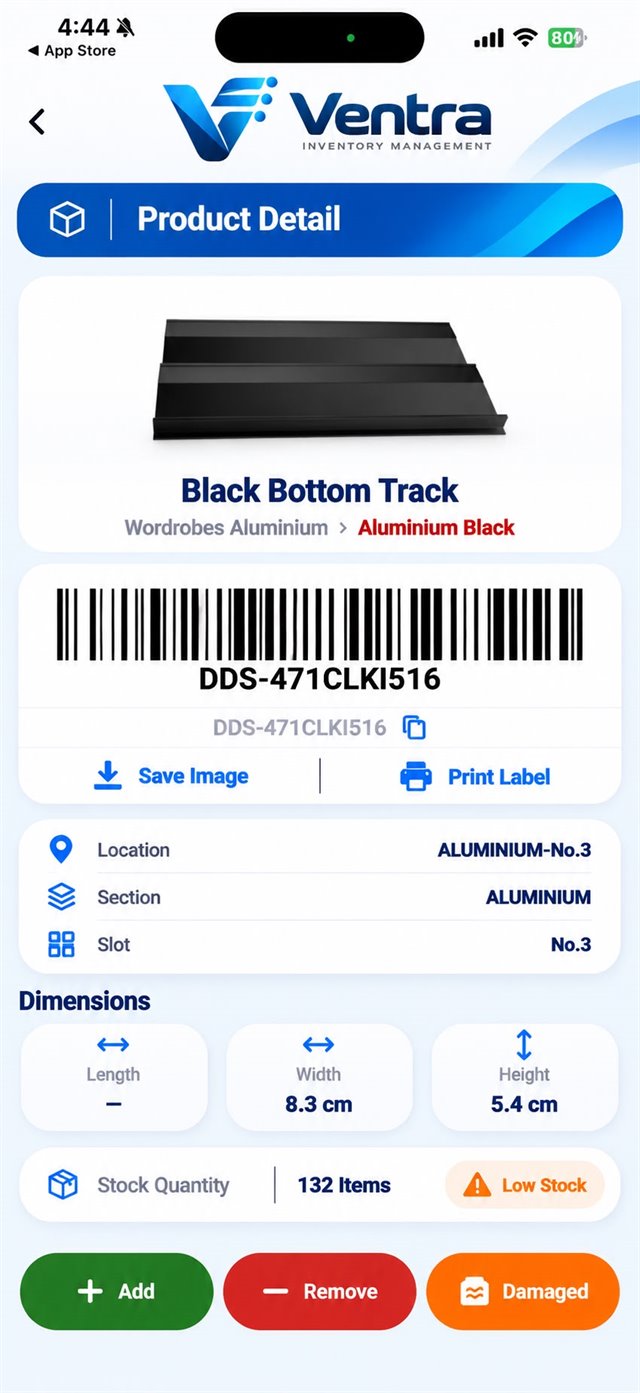
    3. Barcode, exact location, dimensions and stock level together on one screen.

      • Section, shelf & slot
      • Dimensions
      • Stock level
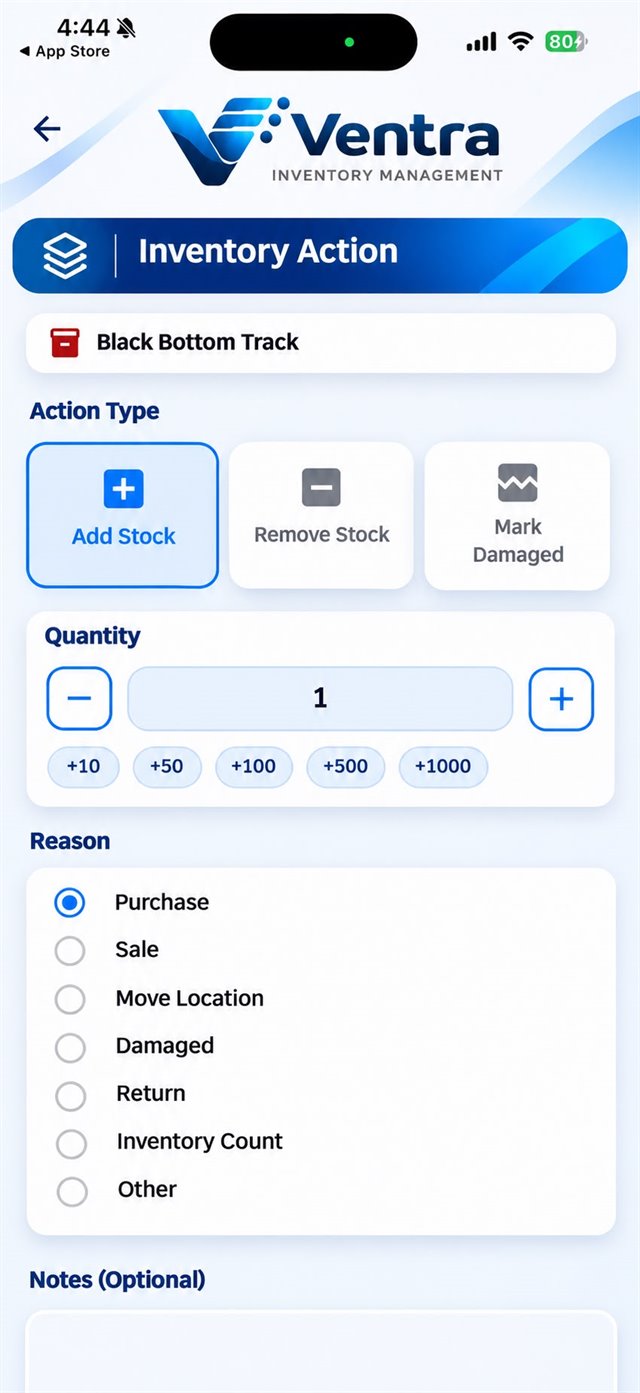
    4. Add, remove or mark damaged, with quick quantities and a reason for each movement.

      • Add
      • Remove
      • Damaged
    5. See what's running low or out, and restock with one tap.

      • Low stock
      • Out of stock
      • Restock
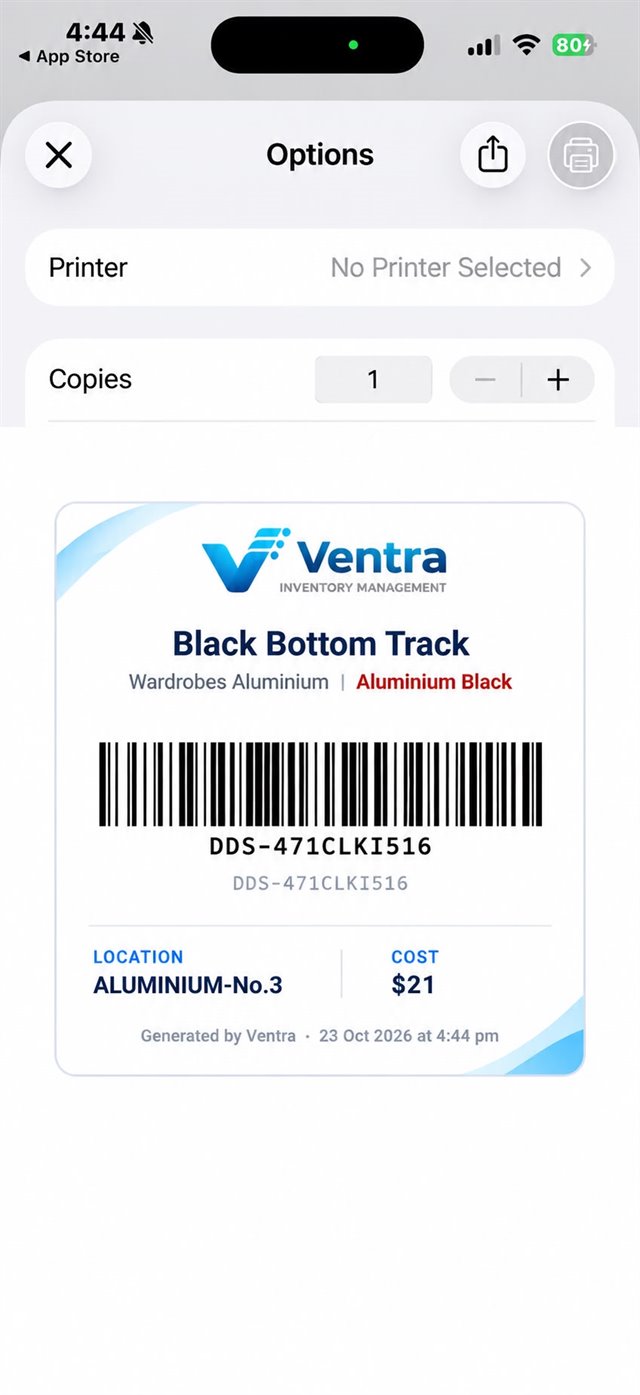
    6. Print or share a barcode label for any product, straight from the phone.

      • Code 128
      • Print
      • Share
    Home screen with inventory overview and quick actions Inventory list with search and stock status filters Product detail with barcode, location, dimensions and stock quantity Inventory action screen to add, remove or mark stock as damaged Alerts screen listing out-of-stock and low-stock products Barcode label preview ready to print

    Everything you need to manage your stock

    Ventra has two parts that work together: a mobile app for the people handling stock, and a web dashboard for the people managing it.

    Mobile app

    For your warehouse and store team

    • Scan barcodesPoint the camera at a barcode to find a product or update its stock.
    • Stock in and outAdd, remove or mark items damaged, with a reason for each change.
    • Low-stock alertsSee what's running low or out, and restock in one tap.
    • Exact locationsSection, shelf and slot for every product.
    • Barcode labelsNo barcode? Ventra creates one, and you print the label from the app.
    • Product requestsManagers ask for new products to be added to the catalogue.
    Web dashboard

    For managers and admins

    • Every branch in one placeSwitch between branches, or see all of them together.
    • Reports and PDF exportDaily and weekly movements, stock by category and low-stock lists.
    • Approve requestsAccept or reject the products your managers ask for.
    • Staff and rolesAdd people with a 4-digit code and decide who can do what.
    • Audit logEvery change, with who made it and when.
    • Your brandingYour name, logo and colours on the app and the dashboard.

    A live control room for managers

    See stock, movements and people across every branch, and change any of it from the browser. This preview works: switch tabs, change the branch or approve a request.

    app.myventra.au
    Live

    Overview

    All locations, live inventory snapshot

    Total products184
    Stock units24,560
    Low stock33
    Out of stock12
    Movements this week
    47 today
    Mon
    Tue
    Wed
    Thu
    Fri
    Sat
    Sun
    Recent movements
    WhenStaffProductQty
    10:42Sarah K.Black Bottom Track+50
    10:15James T.Soft Close Hinge 110°−12
    09:58Ali R.Glass Mirror 1070×2760−1
    09:31Sarah K.Black Grip Profiles+120
    Special feature

    Packages: build finished products from your stock

    Some things you sell are made from parts you keep in stock, like a shelf unit made of panels, screws and brackets. Ventra keeps the list of parts, works out everything an order needs, and updates stock when the warehouse prepares it. Try it below.

    Packages Rack Spacer
    Package nameRack Spacer
    CategoryStorage
    DescriptionStorage rack with shelves and supports

    Parts in one unit

    Add part
    PartPer unit

    Connect your online store or sales system

    We can connect Ventra to the online store or sales software you already use. Every connection is built on request to fit the way you sell.

    Your name, logo and colours, in the app and the dashboard

    Your team opens an app with your company's name, logo and colours, and managers sign in to a dashboard branded the same way. Try it with your own name, colour and logo:

    Brand colour
    Your logo

    Up and running in four steps

    1. 01

      Set up your organisation

      Add your branches, categories and products from the web dashboard.

    2. 02

      Invite your team

      Give each person a 4-digit code. They scan your organisation's QR code in the app to connect.

    3. 03

      Scan and move stock

      Staff scan barcodes to find items and record each addition, removal or damage.

    4. 04

      Track and report

      Managers watch live stock across branches, act on alerts and export reports.

    A plan sized to your business

    Every plan includes the full app and dashboard. Plans differ only in how many people, products and branches they cover. Set yours below and we'll quote it.

    10

    Admins and managers who sign in to the app and dashboard.

    1,000

    Items in your catalogue. A product stocked at several branches counts once.

    2

    Warehouses or sites, each with its own stock and locations.

    Your business in Ventra Updates as you go

    Your setup10 staff, 1,000 products, 2 branches

    Every plan includes
    • iPhone and Android app
    • Web dashboard
    • Barcode scanning and labels
    • Low-stock alerts
    • Requests and approvals
    • Reports with PDF export
    • Roles and audit log
    • Your own branding

    Questions, answered

    Can't find your answer? Get in touch and we'll get back to you.

    The mobile app is on iPhone (App Store) and Android (Google Play). The dashboard runs in any modern web browser at app.myventra.au.

    An admin adds each person in the dashboard and gives them a 4-digit code and a password. In the app, they scan your organisation's QR code or type its ID, then sign in.

    Yes. The app and the dashboard can carry your company's name, logo and colours, so your team sees them as your own tools.

    Yes. Add as many locations as your plan allows. Each one keeps its own stock levels, and the dashboard switches between one branch and all branches.

    No. Leave the barcode field empty and Ventra generates a Code 128 barcode for the product. You can print its label straight from the app.

    Set a minimum stock level for each product. When a product falls to or below that level, it appears under Alerts as low or out of stock, and you can add stock straight from the alert.

    Admins manage everything from the dashboard. Managers work in the app and can request new products, which an admin approves. Every action is recorded in the audit log.

    Yes. The dashboard has daily and weekly movement reports, stock by category, and low and out-of-stock lists. You can download any of them as a PDF.

    A package is a finished product made from parts you keep in stock, like a shelf unit made of panels, screws and brackets. You list its parts once. When sales creates an order, Ventra calculates every part needed, and when the warehouse confirms the order, stock is adjusted for you.

    Yes, on request. We build each connection to fit the online store or sales software you use. Send us a request and tell us what you use today.

    See Ventra running with your own stock

    Tell us about your business. We'll walk you through the app and dashboard, then recommend a plan that fits.

    Please enter your name.
    Please enter your company.
    Please enter a valid email.